What Is a Proxy Server? How It Works, and Real-World Uses
Learn how proxy servers work, how forward and reverse proxies differ, and where HTTPS tunneling, caching, load balancing, and API testing fit into web development.
Written byMonir Hossain
Oct 14, 2026
12 min read
Proxy Servers Explained: How They Work and Why Developers Use Them
Excerpt: Learn how proxy servers work, how forward and reverse proxies differ, and where HTTPS tunneling, caching, load balancing, and API testing fit into web development.
Tags: Proxy Server, Networking, Web Development, Reverse Proxy, Backend Development, API Testing, Cybersecurity
A request does not always travel directly from your browser to a website. It may pass through a proxy that forwards traffic, applies access rules, or serves a cached response.
Proxies also sit in front of many web applications, routing incoming requests to the right backend. Understanding their role helps explain how applications handle traffic—and what a proxy can and cannot protect.
This guide covers the request-response flow, common proxy types, practical testing uses, and security considerations.
1. What Is a Proxy?
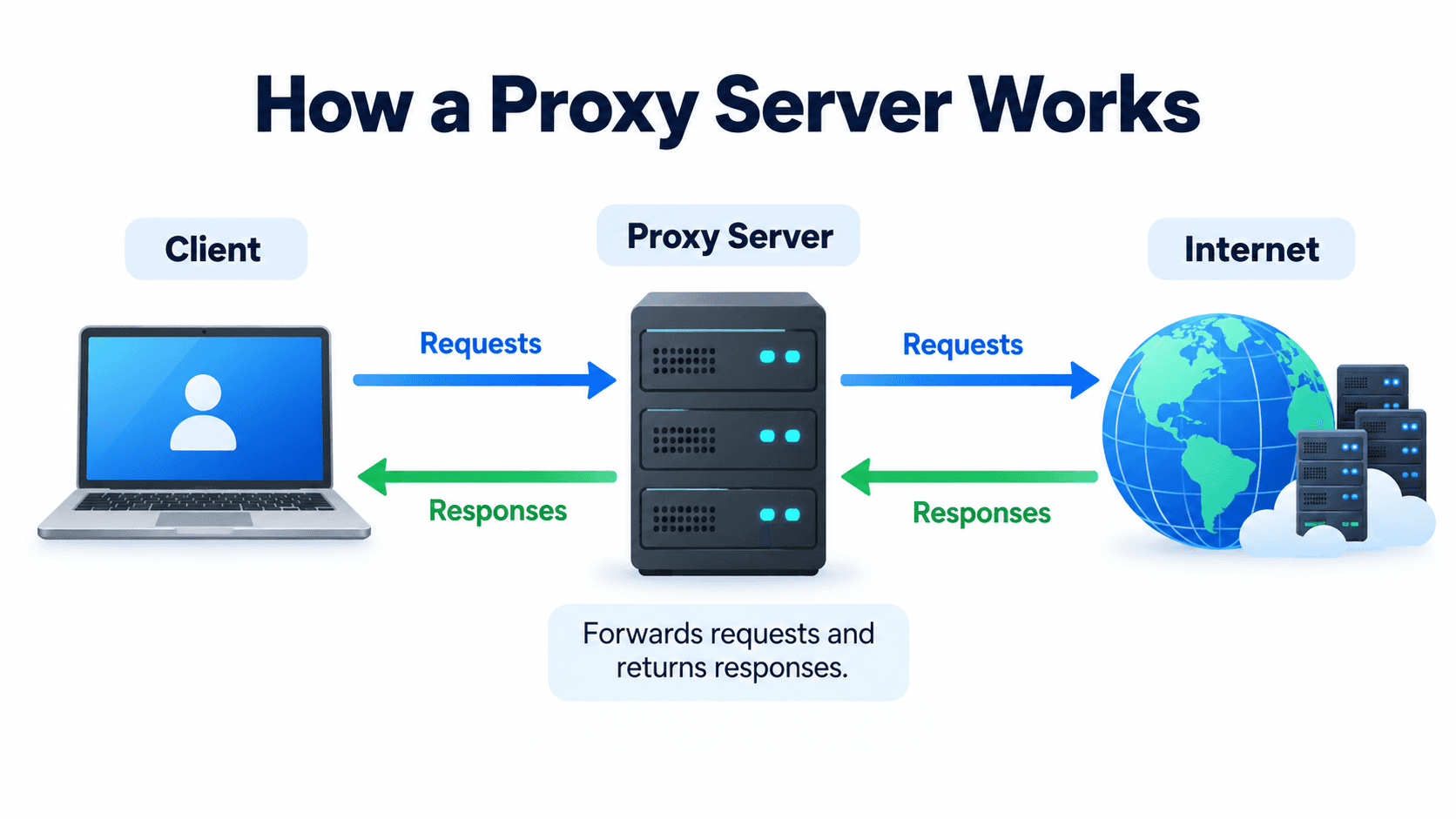
A proxy server is an intermediary between a client and another server. Instead of communicating directly with the destination, the client sends its request through the proxy, which forwards the request and relays the response.
Think of a proxy like a representative who communicates with another organization on your behalf.
For example, when you visit a website, your browser normally sends a request to that website's server. If a proxy is configured, the request travels through the proxy first.
Depending on its configuration, the proxy can filter requests, cache content, control access, route traffic, or hide the client's IP address from the destination.
However, a proxy does not automatically make you completely anonymous or encrypt all your internet traffic.
2. How Does a Proxy Work?
A proxy generally works through four steps.
Step 1: The client sends a request
Your browser requests a webpage, an image, or data from an API.
Step 2: The proxy receives the request
The proxy examines the request and applies its configured rules, such as access restrictions or routing policies.
Step 3: The proxy forwards the request
If the request is allowed and cannot be answered from a valid cache, the proxy forwards it to the destination server. A caching proxy may return an eligible stored response without contacting the destination.
Step 4: The response returns to the client
The destination server responds to the proxy, and the proxy relays the response to the client.
For example, imagine your computer has a public IP address of 203.0.113.10, while your proxy has an IP address of 198.51.100.20.
When you visit a website through a forward proxy, the destination typically sees the proxy's IP address as the connection source. However, a proxy may also forward client information in headers, so replacing the connection's source IP does not guarantee anonymity.
These are documentation-only example addresses.
Keep in mind that the proxy provider may still know your IP address, and websites may identify you through cookies, login sessions, or other browser information.
3. The Two Most Important Types of Proxies
Understanding forward and reverse proxies is essential for anyone learning networking or backend development.
A. Forward Proxy
A forward proxy acts on behalf of the client.
Imagine a company that wants to control which websites its employees can access. The company can configure a forward proxy to inspect requests, block restricted websites, and enforce browsing policies.
Common uses include:
Filtering internet traffic.
Controlling access to websites.
Caching frequently requested content.
Routing requests through a particular network.
Testing how websites behave from different network locations.
Example:
Employee's Computer → Forward Proxy → Website
The forward proxy receives the employee's request and communicates with the destination website.
Key takeaway: A forward proxy represents the client.
B. Reverse Proxy
A reverse proxy acts on behalf of one or more backend servers.
It receives incoming requests and forwards them to the appropriate application server. Clients generally communicate with the reverse proxy instead of connecting directly to internal backend servers.
Imagine an e-commerce application with separate product, order, and authentication services.
A reverse proxy can route requests like these:
Incoming requestDestination/api/productsProduct service/api/ordersOrder service/api/authAuthentication service
Common uses include:
Load balancing across multiple backend servers.
Handling HTTPS connections.
Routing requests to different services.
Applying security rules and traffic restrictions.
Caching eligible responses.
Compressing responses to reduce data transfer.
Popular reverse proxy solutions include Nginx, Caddy, and Traefik.
Key takeaway: A reverse proxy represents the server.
4. How a Reverse Proxy Works in a Web Application
Let's consider a typical web application built with Next.js and an Express or NestJS backend.
For example, your public API could be available at:
https://api.example.com
The reverse proxy receives incoming API requests and forwards them to the backend application running on an internal port, such as 4000.
The backend processes the request and sends its response back through the proxy.
This architecture offers several advantages:
Centralized entry point: Clients communicate through a controlled public endpoint.
Improved traffic management: Requests can be routed to different backend services.
HTTPS management: The proxy can terminate TLS and forward requests to internal services over an appropriately secured connection.
Scalability: Traffic can be distributed across multiple application instances.
Important: A reverse proxy does not automatically secure your backend. You should also configure authentication, authorization, network restrictions, and appropriate security headers.
An API gateway can provide similar routing features while offering additional API-specific capabilities, such as quotas, authentication policies, and usage analytics.
5. HTTP Proxy vs. HTTPS Proxy vs. SOCKS5 Proxy
These terms describe different ways a proxy handles network communication.
HTTP Proxy
An HTTP proxy is designed primarily for web traffic. It can forward HTTP requests. If it supports and permits the HTTP CONNECT method, it can also establish a tunnel for HTTPS connections.
It is commonly used for web filtering, traffic inspection, and controlled access to websites.
HTTPS Proxy
The term can refer to a proxy accessed through an encrypted HTTPS connection or, in some contexts, a proxy used to access HTTPS destinations.
With a standard HTTPS tunnel, TLS remains between the client and the destination: the proxy relays encrypted data without reading the HTTP content. It can still observe connection metadata, such as the destination host and port. Authorized TLS inspection changes this arrangement by terminating TLS at the proxy and creating a separate connection to the destination, typically requiring the client to trust the proxy's certificate authority.
SOCKS5 Proxy
SOCKS5 is a general-purpose proxy protocol that can relay TCP connections and, when supported, UDP traffic.
Unlike an HTTP proxy, it is not limited to HTTP-specific request handling.
It is useful when an application needs to route supported network connections through an intermediary.
The main difference: HTTP proxies understand web-specific traffic, while SOCKS5 provides a more general method of relaying connections.
6. What Are Residential, Datacenter, and Mobile Proxies?
Proxies can also be classified by the type of network their IP addresses come from.
Datacenter Proxy
Datacenter proxies use IP addresses associated with hosting providers or cloud infrastructure.
They are often fast and relatively inexpensive, making them useful for controlled testing and routing automated requests.
Residential Proxy
Residential proxies use IP addresses associated with consumer internet service providers.
They can be useful when authorized testing specifically requires traffic originating from a residential network.
Mobile Proxy
Mobile proxies use IP addresses associated with mobile carrier networks.
They can help developers investigate how services behave when requests originate from mobile networks.
ISP Proxy
ISP proxies use ISP-associated IP addresses hosted on server infrastructure. Their characteristics depend on the provider and network arrangement.
These proxy categories are not inherently anonymous or trustworthy. Websites may still detect automated traffic or recognize IP addresses with poor reputations.
For most web development projects, a paid residential or mobile proxy is unnecessary. A local proxy or a reverse proxy is usually sufficient.
7. Proxy vs. VPN: What Is the Difference?
Proxies and VPNs are related, but they serve different purposes.
FeatureProxyVPNTypical scopeConfigured applications or connectionsRouted device or network trafficApparent source IPOften the proxy’s IPUsually the VPN endpoint’s IPEncryptionDepends on protocol and configurationTypically encrypts traffic within the VPN tunnelAll device trafficUsually requires application-specific configurationPossible, depending on routing and split tunnelingCommon usesFiltering, routing, caching, and testingSecure network access and traffic routing
A VPN typically creates an encrypted tunnel between your device and a VPN endpoint.
A proxy may simply forward requests without encrypting the connection between your device and the proxy.
For example, using an unencrypted HTTP proxy on public Wi-Fi can expose ordinary HTTP traffic. HTTPS can protect the website connection, provided TLS is correctly configured and certificate validation is not bypassed.
Neither a proxy nor a VPN guarantees complete anonymity.
8. Other Types of Proxies
Beyond forward and reverse proxies, several other types are worth understanding.
Transparent Proxy
A transparent proxy intercepts or routes traffic without requiring the user to explicitly configure a proxy in their application.
Organizations and internet providers may use it for traffic filtering, monitoring, or caching.
Caching Proxy
A caching proxy stores eligible responses and reuses them when appropriate.
For example, if many users request the same publicly cacheable image, the proxy may serve a stored copy instead of contacting the original server every time.
This can reduce latency and backend workload.
However, caching must respect content freshness, authorization, and user-specific responses.
Load-Balancing Proxy
A load-balancing proxy distributes incoming requests across multiple backend servers.
For example:
Client → Load Balancer → Server 1 / Server 2 / Server 3
If one server becomes unavailable, the load balancer may route traffic to healthy servers, provided appropriate health checks and failover rules are configured.
Load balancing can improve capacity and availability, but it does not eliminate every possible point of failure.
9. Why Are Proxies Useful in Software Testing?
Proxies are especially useful when debugging web and mobile applications.
Imagine you are testing an e-commerce application. You place an order, but the confirmation message never appears.
A proxy-based debugging tool can help you inspect the application's network requests and responses in an authorized testing environment.
You can investigate questions such as:
Did the application send the order request?
Did the server return 200, 400, 401, 403, or 500?
Was the response body correct?
Did the request include the expected authorization header?
Did the request time out?
Did the application send duplicate requests?
Tools such as Charles Proxy and mitmproxy can help inspect HTTP and HTTPS traffic.
HTTPS inspection may require a trusted test certificate. Applications using certificate pinning may reject interception, and security protections should only be modified in environments where you have permission.
10. A Practical Example: Sending a Request Through a Proxy
You can test an HTTP proxy with curl before configuring it in an application:
This command uses a proxy at 127.0.0.1:8080 and limits the overall operation to ten seconds. It assumes a proxy is already running at that address; the command does not create one.
For the HTTPS destination, curl normally asks the HTTP proxy to open a tunnel using CONNECT. TLS then protects the communication with the destination, unless a trusted inspection proxy terminates it.
In application code, proxy configuration depends on the HTTP client and proxy protocol. Check the client's documentation rather than assuming HTTP, HTTPS, and SOCKS5 proxies use the same options. Keep credentials outside source code and avoid logging them.
11. Security Risks of Proxy Servers
Although proxies provide useful networking capabilities, they can introduce security risks when configured incorrectly.
Sensitive information exposure: An untrusted proxy may log connection metadata or inspect traffic it is able to decrypt.
Credential theft: An improperly configured TLS inspection proxy may expose sensitive information.
Incorrect caching: A misconfigured cache could accidentally serve private or outdated responses to the wrong users.
Open proxy abuse: An unrestricted proxy may allow unauthorized users to route traffic through your infrastructure.
Misconfiguration: Exposing internal services directly to the internet can undermine the benefits of a reverse proxy.
To reduce these risks:
Use trusted proxy providers.
Validate HTTPS certificates.
Protect proxy credentials.
Restrict access to internal backend services.
Configure caching carefully for authenticated responses.
Monitor traffic and apply appropriate access controls.
A proxy should be part of a broader security strategy rather than treated as a complete security solution.
12. Frequently Asked Questions
Does a proxy hide my IP address?
A proxy can hide your original IP address from the destination for traffic routed through it. However, the proxy provider may know your IP address, and other identifying information may still be available.
Is a proxy the same as a VPN?
No. A proxy forwards selected traffic or connections, while a VPN typically routes traffic through an encrypted tunnel. Their capabilities depend on their configuration.
Is a reverse proxy necessary for every website?
No. Small applications can operate without a separately configured reverse proxy. However, reverse proxies are useful for routing, TLS management, load balancing, and other deployment needs.
Does a proxy make a website faster?
Sometimes. A caching proxy can reduce latency for eligible responses, and a well-configured proxy can optimize traffic handling. However, an additional intermediary may also introduce latency.
Do I need a proxy as a web developer?
Not always. Understanding proxies is valuable for debugging network requests, deploying applications, managing backend traffic, and designing production architectures.
Conclusion
A forward proxy handles traffic on behalf of clients. A reverse proxy receives traffic on behalf of servers. Depending on configuration, either can support routing, access control, or caching.
For developers, the most useful starting points are understanding the request-response flow, debugging API traffic, and learning how reverse proxies handle application routing and TLS. Treat encryption, anonymity, and security as separate properties to verify—not automatic benefits of adding a proxy.